

40
Testimonials Collected

Read client testimonials across workplace training, coaching, translation, bilingual resources, and multilingual communication support.
40
Testimonials Collected
18+
Organizations Represented
12
Programs & Service Contexts
A few standout comments that capture the impact of Workplace Languages across training, coaching, and multilingual support.

Restaurant Training & ROI
“We have worked with Ed Rosheim at Workplace Languages for over 9 years now. We have offered Spanish speaking classes for Senior Management Team, our Multi-Unit Managers and Restaurant Managers to enable them to more…”
Carol Williams & Lee Engler
VP Operations / Owner and President
Border Foods Co.'s

Training, Translation & Web Translation
“Workplace Languages is a fantastic business partner to work with. They have helped Sodexo with so many projects, from language training to document and web translation. I can always count on Ed and his team to be…”
Jennifer (Grabiec) Williamson
Senior Vice President, Corporate Communications
Sodexo

French Online Cohort
“The class has been excellent. I’ve learned quite a bit which has gone towards helping me correct my grammar so that my writing, reading and general understanding have improved. I believe the class provides a variety of…”
Adrienne Colbert
Cloud & Infrastructure Services Senior Consultant
L'Oréal
Spanish Reference Guide
“I wanted to send a THANK YOU for the Spanish reference guides!!! This reference guide is so important to help our teams develop deeper connections; I love that it has translations for questions to not only help…”
Adri Erickson
Human Resources Manager II
Cintas
Every card uses the same layout, with the full testimonial opening in a modal so the archive stays easier to scan.
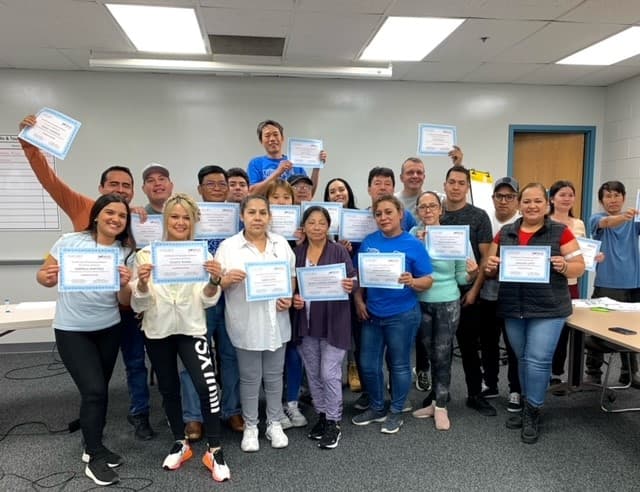
In-Person Workplace Spanish
“The City of Oakdale utilized the services of Workplace Languages in early 2009. The intent was to teach a group of staff members the basics of survival workplace Spanish, so as to better serve our diversifying…”
Logan Martin
Community Development Specialist
City of Oakdale
Restaurant Training & ROI
“We have worked with Ed Rosheim at Workplace Languages for over 9 years now. We have offered Spanish speaking classes for Senior Management Team, our Multi-Unit Managers and Restaurant Managers to enable them to more…”
Carol Williams & Lee Engler
VP Operations / Owner and President
Border Foods Co.'s
Training, Translation & Web Translation
“Workplace Languages is a fantastic business partner to work with. They have helped Sodexo with so many projects, from language training to document and web translation. I can always count on Ed and his team to be…”
Jennifer (Grabiec) Williamson
Senior Vice President, Corporate Communications
Sodexo
Survival Spanish Seminar
“This was fantastic! The speaker was excellent, the venue was easily accessible and the material was relevant. Lots of fun!”
Kristin Fahey
CMAA Seminar Attendee
Survival Spanish Seminar
“I thought the instructor was excellent. He was able to relate well to the students while at the same time he provided a lot of info in a short period of time in an interesting and understandable format. He is a keeper!!!”
Bill Tallman
CMAA Seminar Attendee
Survival Spanish Seminar
“I thought the seminar was very helpful. I started using some of the terms as soon as I returned from the meeting, and my Spanish-speaking employees seemed to be VERY appreciative. Thanks!”
Sue
CMAA Seminar Attendee

Survival Spanish Seminar
“Your presentation was simple to understand and not complicated with unnecessary grammar peculiarities. It enabled me to draw on my high school Spanish lessons which, quite frankly, I never thought I would use again-sooo…”
Anita B. Boyle, CCM
General Manager
North Carolina State University Club, Inc.

Survival Spanish Seminar
“Before attending Ed Rosheim’s seminar “Communicating with Your Spanish Speaking Staff”, I envisioned an impatient Latino making us sound like fools as he hurried us through 90 minutes of bi-lingual hell. This wasn’t the…”
Peter Donovan
Clubhouse Manager
The Country Club of Little Rock
Survival Spanish Seminar
“I just wanted to thank you for a great experience on my final day at conference. I was not sure which class to attend and made a last minute decision to brush up on my limited Spanish skills. You made all of us feel…”
William Duy
Club Manager
Biltmore Country Club

Survival Spanish Seminar
“Your seminar in New Orleans was fantastic.”
Catherine Evans, CCM
Vice-President of Operations
Country Club Services, Inc.
Survival Spanish Seminar
“I enjoyed your class very much!”
Michael Rudon
Spring Brook Country Club
Survival Spanish Seminar
“I want to thank you most sincerely for a great seminar in New Orleans recently at the CMAA World Convention. I found your seminar very informative and interesting; I am a total dunce regarding Spanish and realize even…”
Peter J. Tunley, CCM
General Manager/COO
The Stanwich Club

Survival Spanish Seminar
“Ed Rosheim’s seminar was both entertaining and informative. As the workforce becomes more global in nature, it is absolutely critical that we, as managers, invest time in developing our foreign language skills. Ed made…”
Steven Gonzalez, CCM
General Manager
Wildwood Golf Club
Survival Spanish Seminar
“Your seminar, although brief, was very helpful and inspirational - as to giving us hope that we can communicate on some basis with our Spanish-speaking crew members. Thank you.”
Donald E. Beaver, Jr., CCM
General Manager/COO
Kensington Golf and Country Club
Online Spanish Training
“The instructors are fun, friendly, and encourage you to challenge the training and expand on the verbiage. Lessons were always reviewed before they ended and again reviewed when the next lesson started. A great…”
Toni M. Bianco
Sr. Director Global R&D
Papa John's International
Online Spanish Training
“To sum up, I thought the program was great. The pace was good, and I learned a lot of information in a short amount of time. Jessica was a phenomenal teacher who was patient yet productive. If there are any openings,…”
Joel Cooney
Operations Specialist-West
Papa John's International
Online Spanish Training
“It has been wonderful!! I'm sad that it is over. Ariel is absolutely wonderful.”
Marja Wallace
General Manager
Sodexo Campus Services
Online Spanish Training
“My ultimate goal is to be able to communicate at the restaurant to the Outbackers. I could communicate a little before taking the class, but the lessons with Jessica took me to an entirely different level! Jessica was…”
Kelly Kjolhede
Regional Director of Training
Outback Steakhouse
Online Spanish Training
“I have learned tons! I am understanding bits and pieces as I hear our Latino Outbackers converse in Spanish. So exciting!”
Annie Eastman
Regional Director of Training
Outback Steakhouse
Online Spanish Training
“I love that we speak Spanish almost the entire time. The instructor is fabulous! He has a good sense of humor, is ultra-patient and is a great teacher.”
Becky Boyd
Regional Director of Training
Outback Steakhouse

Spanish Translation Support
“Thank you so much for your quick turnaround! We truly value our partnership with you, and we're grateful for the collaborative spirit that you bring to every opportunity, big and small. We've reviewed the attached…”
Theresa Dwulit
Training and Content Designer
First Watch
Spanish Reference Guide
“I wanted to send a THANK YOU for the Spanish reference guides!!! This reference guide is so important to help our teams develop deeper connections; I love that it has translations for questions to not only help…”
Adri Erickson
Human Resources Manager II
Cintas
Portuguese Online Cohort
“The Portuguese L2 classes I took with Thiago were amazing. He’s a great professor and the dynamics of each class were insightful and fun at the same time. What I liked the most from the classes is that Thiago motivates…”
Max Cruz
Content Program Manager
L'Oréal
Portuguese Online Cohort
“Nossa equipe é formada por várias pessoas do Brasil, e o português é essencial para gerar empatia e uma boa proximidade com o meu time. Não só isso, eu tenho muitas reuniões com as equipes locais do Brasil, discussões…”
Irina Dallarosa
IT Leader of Supply Chain for LATAM
L'Oréal
French Online Cohort
“J’ai appris les bases du français — cela m’aidera au moins à parler et à m’adresser aux Français. Je suis très reconnaissant pour cette opportunité.”
Rupak Das
Director, IT, Ops and Fin, North America
L'Oréal
French Online Cohort
“French Level 2 class has significantly enhanced my learning experience from Level 1. By learning past and future tenses, constructing more complex phrases, and expanding my vocabulary and pronunciation, I now feel…”
Guillermo Medrano
IT Director
L'Oréal
French Online Cohort
“For me I am extremely happy with my French lessons. It is really amazing to see that I am not that lost. I felt I learned a lot in just a few classes. I liked a lot how you explain everything, it is pretty clear and you…”
Blanca Elisa Ortiz Aleman
Executive Assistant LDB & IT LATAM
L'Oréal
French Online Cohort
“First of all, I’d like to say that this level 2 class has been a wonderful experience! It got a little bit more complicated due to the new topics we review during the class. But what I really want to emphasize is your…”
Adolfo Bautista
IT Business Analyst
L'Oréal
French Online Cohort
“Bonsoir Eugenia, ce fut un plaisir de vous rencontrer et le cours était excellent.”
Alejandra Garcia
L'Oréal
French Online Cohort
“The class has been excellent. I’ve learned quite a bit which has gone towards helping me correct my grammar so that my writing, reading and general understanding have improved. I believe the class provides a variety of…”
Adrienne Colbert
Cloud & Infrastructure Services Senior Consultant
L'Oréal
Spanish Online Cohort
“Antes de este curso, me sentía un poco intimidada por aprender un nuevo idioma, pero tu entusiasmo y el ambiente de apoyo en el aula lo hicieron mucho más accesible y agradable. No solo me has ayudado a desarrollar mis…”
Gail Vinisky
Director of Quality Assurance
L'Oréal
Spanish Online Cohort
“Spanish lessons have been a fantastic experience! What I appreciated most is how accessible the learning process was, thanks to its step-by-step approach. I never felt overwhelmed, as each lesson built upon the last in…”
Claire Nicolas
Sr Mgr IT Project Manager
L'Oréal
Spanish Online Cohort
“I've enjoyed the classes with Thiago so much! He is always with such a good vibe that helps everyone to want to try the new language. Even if Spanish is very very similar to Portuguese, Thiago helps to realize the…”
Eduardo Enciso
Online Excellence Coordinator
L'Oréal
Spanish Online Cohort
“You are an amazing professional & gifted teacher!”
Lucas Mariano
IT Project Manager
L'Oréal
Spanish Online Cohort
“Gracias por todo este tiempo, por tu amabilidad, amabilidad y delicadeza al intentar comprenderme y corregirme durante las clases.”
Karina Yoko
IT Business Relationship Manager
L'Oréal
English Online Cohort
“Riley is the best teacher! Thank you for your patience and support.”
Georgina Tahan
Finance PM LATAM
L'Oréal
English Online Cohort
“Riley is an amazing teacher. She is very didactic, and she always made sure to give us all the tools and resources we needed to practice and improve every topic covered during the class. It is a privilege to have a…”
Carlos Alberto Martínez Corchado
IT Project Manager – Operations & Finance
L'Oréal
English Online Cohort
“All the content was helpful for me. I would have liked to have had more sessions!”
Viridiana Arisvette Garcia Ortiz
L'Oréal
English 1:1 Coaching
“In our 1:1 sessions with Riley, we worked on my weaknesses. Even though I know I am advanced, I have gained so much improvement and new knowledge from her classes. She is incredibly organized and an excellent teacher…”
Maria Veronica Sanchez
SAP Expert
L'Oréal
English Online Cohort
“It was a great course. I improved my communication and writing and feel more confident speaking with others in meetings.”
Daniel Díaz Granados
System Architect (ODES)
L'Oréal
Tell Workplace Languages about your team, your communication goals, and the languages involved. We can recommend the right next step.
Trusted by global enterprises







































Organizations evaluating Workplace Languages and stakeholders who want to understand how the team collaborates with HR, L&D, operations, and other program owners.
The page is designed to give stakeholders practical context, examples, and planning guidance they can use to evaluate options and align on next steps.
It helps teams compare priorities, clarify rollout questions, and connect language support decisions to measurable business outcomes and implementation realities.
Yes. After reviewing your goals, team structure, and communication challenges, Workplace Languages can recommend the most relevant training, services, or rollout approach.
Use the contact form to share your goals, stakeholders, and timeline, and the team will recommend the most useful next step.
Share your languages, locations, and goals through the request form, and the team will recommend the best next step.